Article
Infrastructure
hlab: Turning a Proxmox Homelab into a Tiny Platform
A hobby project that turns Proxmox VM creation into a self-service platform experience: plans, templates, a dashboard TUI, and a headless CLI for automation and AI agents.
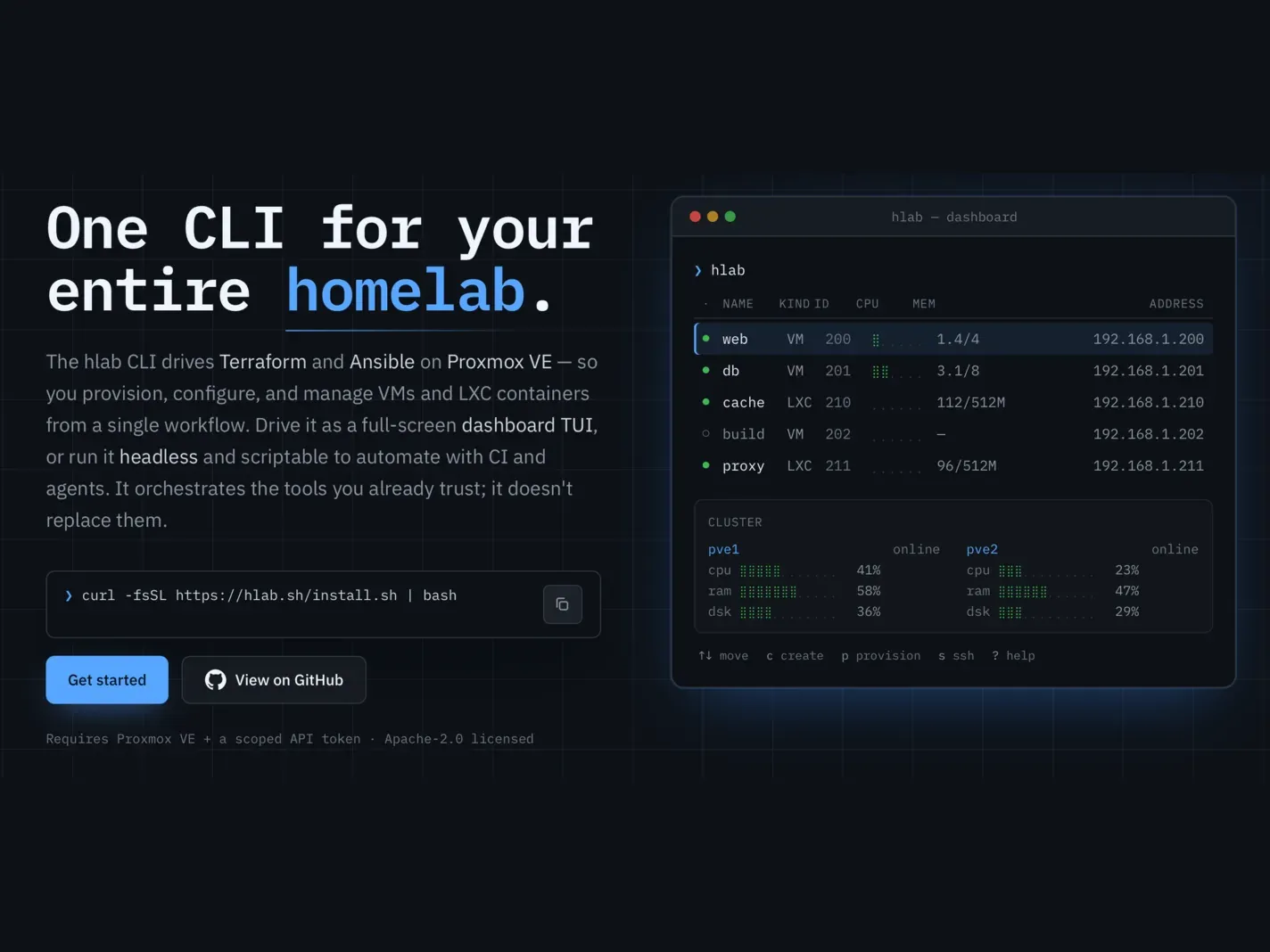
There is a moment in every serious homelab where the fun starts turning into bookkeeping.
Creating one VM in Proxmox is pleasant enough. Creating the tenth is different. You start remembering which node has the right template, which storage should be used, which bridge belongs to the LAN, which VM ID range you reserved for experiments, and which cloud-init image still has the guest agent installed correctly.
At that point the problem is no longer virtualization. The problem is that your homelab has become a tiny cloud, but you are still operating it like a collection of hand-clicked machines.
That is the gap hlab tries to close. It is an open-source hobby project for creating and managing Proxmox VMs and LXC containers from the terminal, with a project site at hlab.sh. The idea is simple: keep the power of Proxmox, Terraform, and Ansible, but expose them through an experience that feels closer to a small Platform-as-a-Service than a pile of infrastructure scripts.
Repositoryaikssen/hlabOpen-source terminal tooling for creating and managing Proxmox VMs and LXC containers through a dashboard TUI and scriptable CLI.The observation: homelabs grow platform-shaped
Most homelabs do not start with platform engineering ambitions.
They start with a practical need: a VM for a reverse proxy, another one for a database, a temporary Kubernetes node, a Linux sandbox, a CI runner, a container for monitoring. The first few machines are manageable because you remember the decisions. After a while, the decisions repeat often enough that they become a workflow.
And repeated workflows eventually want a product surface.
This is why hlab does not begin from the question “how do I generate Terraform?” It begins from the more useful question: “I want a new server; what does the tool already know?”
The useful metric here is time-to-first-experiment. A homelab is healthy when curiosity can move quickly from “I want to try this” to “I have a disposable machine where I can break it safely.” Every remembered bridge name, every hand-written inventory, and every forgotten VM ID stretches that distance.
The mental model: a tiny PaaS for Proxmox
Public PaaS products are useful because they hide the boring shape of infrastructure behind a small number of choices. You pick a plan, a runtime, maybe a region, and the platform handles the underlying machinery.
hlab applies that idea to a homelab.
It does not replace Proxmox. It does not pretend your rack is AWS. It simply gives your lab a self-service layer:
| Platform idea | How hlab maps it to a homelab |
|---|---|
| Region or placement | Proxmox nodes discovered through the API |
| Machine image | A VM template already built by the user |
| Instance size | Predefined plans such as nano, KVM1, KVM2, KVM4, KVM8 |
| Custom size | Manual CPU, memory, and disk when a plan is not enough |
| Add-ons | Provisioning catalog through Ansible: Docker, Podman, k3s, runtimes, dotfiles, agent CLIs |
| Day-2 operations | SSH, snapshots, migration, resize, update, destroy |
That mapping is what makes the project interesting. It is not a wrapper that merely shortens commands. It is a small product layer over a real infrastructure substrate.
DIAGRAM
The TUI: where the platform feeling appears
The primary experience is the dashboard TUI. Running hlab with no arguments opens a full-screen interface where VMs and containers can be inspected and managed without leaving the terminal.
From that dashboard, the create flow behaves like a platform form rather than a Terraform questionnaire.
First, you choose whether you want a VM or an LXC container. Then the tool asks for the image. For VMs, that image is not an arbitrary ISO; it is a Proxmox VM template that you have already built. That constraint matters. A reliable VM factory starts with reliable golden images. If the template has the right guest agent, cloud-init setup, base packages, and disk layout, every clone inherits those decisions.
The selected template also gives hlab useful information. Templates live on specific Proxmox nodes, and a clone often needs to land where the template and local storage make sense. Instead of making the user answer everything manually, the TUI lets the infrastructure guide the choices.
Then comes the plan.
Create VM
Template ubuntu-24.04-template (#200) · pve1
Plan nano 1 CPU · 1 GB RAM · 10 GB disk KVM1 1 CPU · 2 GB RAM · 16 GB disk KVM2 2 CPU · 4 GB RAM · 32 GB disk KVM4 4 CPU · 8 GB RAM · 48 GB disk KVM8 8 CPU · 16 GB RAM · 64 GB disk CustomThis is the PaaS-like part. Instead of deciding CPU, RAM, and disk every time, most VMs can be described by intent: small sandbox, normal service, heavier node. When the catalog is not enough, Custom keeps the escape hatch open.
After that, the TUI asks for identity and networking: VM ID, hostname, DHCP or static IP, gateway and DNS when needed, admin user, password, and optional SSH key. Before applying anything, it shows a review screen. That review step is important because the tool is about reducing accidental infrastructure work, not hiding consequences.
Under the hood: Terraform and Ansible without the maintenance burden
The design is intentionally two-phase.
create builds the guest. provision installs software.
That split keeps the lifecycle honest. Terraform owns the machine shape: VM or container, ID, CPU, RAM, disk, network, and Proxmox lifecycle. Ansible owns what happens inside the guest: Docker, Podman, k3s, Node.js, Go, Python, Rust, dotfiles, and terminal agent tooling such as Claude Code, OpenCode, and Hermes.
The user does not maintain those Terraform and Ansible files by hand. hlab generates and orchestrates them from a small declaration stored under ~/.hlab.
~/.hlab/ config.yaml Proxmox URL, API token, defaults, SSH keys, dotfiles repo plans.yaml editable VM and LXC size catalogs vms/ per-guest declarations terraform/ generated Terraform workspace ansible/ generated inventory and provisioning dataThat layout gives the homelab something many ad-hoc setups lack: a source of truth. The dashboard feels interactive, but the outcome is still declarative enough to inspect, version, and reason about.
DIAGRAM
The headless CLI: automation, scripts, and AI agents
The TUI is the friendliest surface, but not the only one.
Every important action also has a CLI form. That matters because infrastructure tools eventually get used by other tools: shell scripts, CI jobs, cron tasks, bootstrap scripts, and increasingly, AI agents that need a safe and repeatable way to request infrastructure.
For example, an agent or automation script should not have to drive a terminal UI to create a disposable VM. It can use the headless command path instead:
hlab vm create \ --name agent-sandbox \ --vmid 6201 \ --template ubuntu-24.04-template \ --plan KVM2 \ --dhcp \ --user admin \ --password "$HLAB_VM_PASSWORD"
hlab vm provision agent-sandbox --software docker,node,go,opencodeThat is where hlab becomes more than a convenience wrapper. The TUI gives humans a good operating cockpit. The CLI gives automation a stable contract.
The same pattern applies to containers:
hlab ct create \ --name cache \ --vmid 6210 \ --template-file 'local:vztmpl/debian-12-standard.tar.zst' \ --plan small \ --dhcp=false \ --ip 192.168.1.210/24 \ --gateway 192.168.1.1 \ --password "$HLAB_CT_PASSWORD"For AI-assisted workflows, that distinction is useful. A human can explore and confirm through the dashboard. An agent can request a known plan, provision a known software set, run work, and destroy the guest later. The interface is predictable enough to automate, but still grounded in the same declarations the human sees.
Day-2 operations are part of the product
Creating a VM is only the first operation. A homelab tool becomes valuable when it also handles the second, third, and twentieth operation.
hlab includes the expected day-2 actions: SSH, start, stop, reboot, snapshot, rollback, resize, migrate, update, destroy, and drift checks through hlab plan. It can also adopt existing VMs or containers that were created outside the tool, importing them into its management model without modifying the live guest when adoption is not safe.
That last detail is important. Hobby infrastructure still deserves cautious tooling. A good homelab tool should make experimentation faster without making destruction easier by accident.
Trade-offs: what hlab assumes
hlab is opinionated, and those opinions are part of the design.
The largest assumption is that VMs should be cloned from templates the user has already prepared. That is a good constraint when you want repeatability. It is less convenient if your normal workflow is downloading ISOs and installing machines manually every time.
The second assumption is that Terraform and Ansible are the right execution engines. That keeps the tool built on mature infrastructure primitives, but it also means the machine running hlab needs those tools available. The installer helps with that, but the dependency is real.
The third assumption is that a homelab benefits from a little platform thinking. For a single Proxmox host with two long-lived VMs, the abstraction may be unnecessary. For a two-node lab where you frequently create, resize, provision, snapshot, and destroy guests, the leverage starts to appear.
Why it is worth watching
The interesting idea behind hlab is not that it can create a VM. Proxmox can already do that.
The interesting idea is that even a homelab benefits from a product surface once the same infrastructure decisions repeat often enough. Plans encode sizing. Templates encode operating-system choices. The TUI encodes the human workflow. The CLI encodes the automation contract. Terraform and Ansible encode the execution.
That combination turns “I need another server” into a smaller, safer, more repeatable action.
If you run Proxmox at home and want your lab to feel less like a sequence of manual chores and more like a small internal platform, start with hlab.sh, then explore the source at github.com/aikssen/hlab.
Key takeaways
hlabis an open-source hobby project that gives Proxmox homelabs a self-service terminal experience.- Its mental model is close to a tiny PaaS: templates as images, plans as instance sizes, provisioning as add-ons, and day-2 operations as platform actions.
- The TUI is the main human workflow and should be the first place most users experience the tool.
- The headless CLI matters for scripts, CI, repeatable automation, and AI agents that need infrastructure without driving a UI.
- The main constraint is deliberate: reliable VMs start from reliable templates built by the user.
Continue exploring
- Visit the project site: hlab.sh
- Read and contribute to the source: github.com/aikssen/hlab
- Related concepts: Homelab, Proxmox, Internal Developer Platforms, Golden Images, Infrastructure as Code
// continue exploring